
Skip to content

Home / Website design / School and kindergarten websites

School and kindergarten websites

A school website that presents your stages and simplifies admissions enquiries

We design WordPress company profile websites for private schools, kindergartens and training centres: up to 3 pages in one language, with a home page covering the school and its stages, a facilities and activities page, and an admissions and contact page whose form asks only for the parent's details, never the child's. It costs JOD 150 / ⁦$212⁩ when the site is hosted on our Managed Site plan (current offer); the regular design price is JOD 250 / ⁦$353⁩. Design, delivery and 2 revision rounds take 10 working days from receiving your full content.

  • Up to 3 pages in one language: Home with stages, Facilities and Activities, and Admissions and Contact with the privacy policy
  • Design, delivery and 2 revision rounds within 10 working days of receiving your full content
  • Launched on Start Bigger Managed Site, domain registered in the school's name, WhatsApp support in Arabic and English

We reply within within 4 business hours during business hours. No payment before a written quote, and the timeline starts when your content arrives, so prepare it before admissions season.

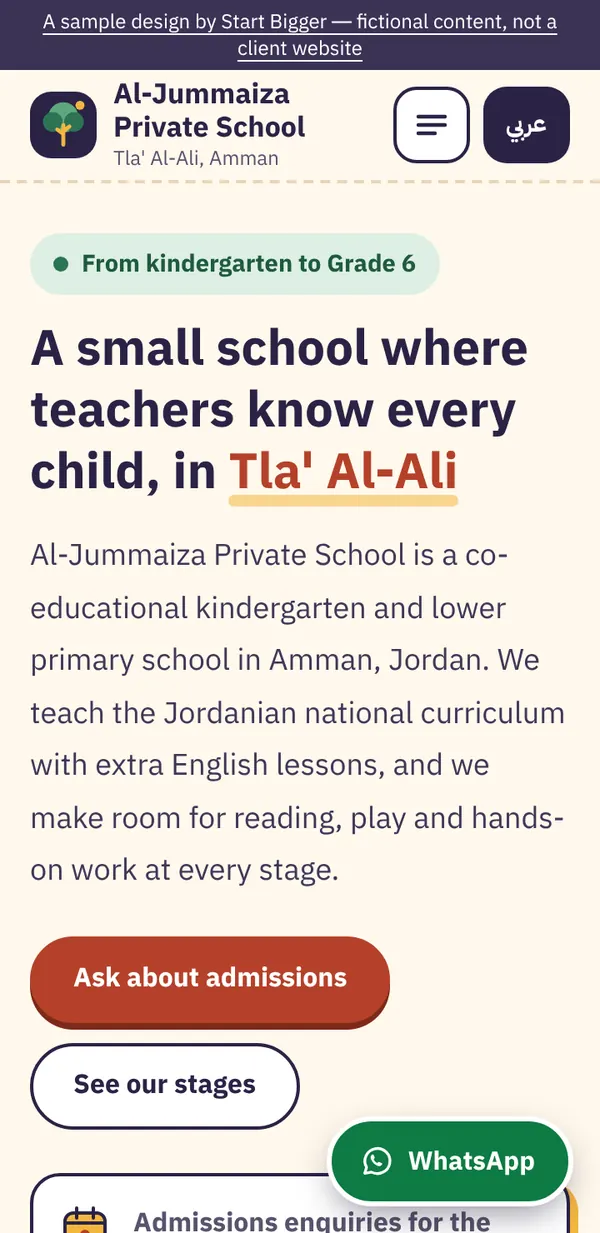
Screenshot of a sample design on a phone Sample design

Everyday school situations your website can handle

In admissions season the office phone rings all day with the same questions: which stages do you have, are there buses, when can we visit?

An admissions page that walks through the steps from enquiry to visit to handing in documents, with bus areas and school hours, so staff send a link instead of explaining on every call.

Parents ask about fees first, and the school doesn't want to publish them to everyone, or changes them every year.

The school decides: show fees on the admissions page, put them on a page kept out of menus and search results and send the link to parents who ask, or let the admissions office send them.

School announcements get lost among Facebook and Instagram posts, and parents keep asking: are admissions open, when is the open day?

A fixed announcement bar on the home page that the office updates from the dashboard, and in a larger site a full news and events section.

Parents want to see the place before visiting, and the school doesn't want to publish pupils' faces.

The facilities and activities page shows classrooms, yards, library and lab in photos of the premises with no pupils. Any photo in which a pupil appears goes up only with that parent's written consent and at the school's decision.

What does a school or kindergarten website include?

The package covers up to 3 pages, which a school site uses like this: Home with the school profile and its stages, Facilities and Activities, and Admissions and Contact with the privacy policy. A separate page per stage, news and announcements, an English version and a training-centre course catalogue come with a larger site, priced in a written quote.

  1. Home: the school and its stages

    In the package

    A short introduction to the school and its curriculum, a section per stage (kindergarten, primary and secondary as the school offers) with what pupils learn and an example school day, a short announcement bar such as admissions opening, and WhatsApp enquiry and call buttons at the top.

  2. Facilities and activities

    In the package

    Classrooms, library, labs, yards and sports areas, plus after-school clubs and their days, in real photos of the premises with no pupils' faces. The school can also state its pupil photo policy here.

  3. Admissions, contact and privacy policy

    In the package

    Admission steps from enquiry to visit to handing in documents at the school, bus areas, and fees if the school chooses to show them. Then a form asking only for the parent's name, phone, preferred time to call and the stage of interest, with a consent box, plus map, hours and a privacy policy explaining what is collected, why, and how parents can ask for deletion.

  4. A page per stage (larger site)

    In a larger site

    A full page for kindergarten, another for primary and another for secondary, with the curriculum, subjects, a school day and parents' questions for that stage, so you can send the link to parents asking about one stage.

  5. News and announcements (larger site)

    In a larger site

    A section the office runs from the dashboard: admissions opening, open days, the school calendar and holidays, with links to the school's Instagram and Facebook accounts.

  6. English version (larger site)

    In a larger site

    A full English version for schools with international programmes or for parents who don't read Arabic, each language in its own direction, with translations the school supplies or approves.

  7. Training-centre course catalogue (larger site)

    In a larger site

    A card per course with duration, dates, level and how to enrol, and a form where adult trainees enter their own details. For children's courses, the form asks for the parent's details instead.

Features a school website needs, and why

An enquiry form that asks only for the parent's details

The form asks for the parent's name, phone, preferred time to call and the stage of interest. It never asks for the child's name, age, date of birth, photo or health. Pupil details are completed at the school during actual enrolment, so the website collects as little data as possible.

An email alert for every enquiry

Each enquiry reaches the admissions office inbox with the parent's preferred time to call, so the office calls back at that time. In admissions season, no request gets lost between phones and messages.

Sticky WhatsApp and call buttons on mobile

Parents' questions are usually short: is there a place in KG2, does the bus reach our area? A button that stays on screen gets them to admissions in one tap, without hunting for the number.

An announcement bar the office updates

Admissions opening, Ramadan hours or the open day date: the office types it into a ready-made field in the dashboard and it shows at the top of the home page, while the design stays exactly as it is.

Fees shown the way the school chooses

Some schools publish fees, others prefer to send them on request. We put them on the admissions page, on a separate page hidden from search engines and kept out of menus, or leave them to the admissions office. A hidden page opens for anyone with the link, so it is not private, and it counts as one of the site's pages.

Page titles, descriptions and Google Search Console

Each page gets a title and description for search results that include the school name, stages and area, and we add a sitemap and connect Google Search Console, with no ranking promises. We write the school name and address exactly as on your Google Business Profile, and Google's guidelines list schools among the places that shouldn't show opening hours on their profile.

Sample design

A sample school website

We built a sample school website so you can open it on your phone before you message us. It is a sample we made ourselves: the school and its content are fictional, it is not a client's site, and its illustrations are simple shapes with no pictures of children. It shows a fuller site than the package, so some parts, such as the news section and the English version, come with a larger site.

  • Stages from kindergarten to Grade 6, each with a short profile and an example school day
  • Facilities and activities in illustrations of the premises, and a photo policy requiring parents' written consent
  • Admission steps and bus areas, with a note that the fee list is sent on enquiry
  • A four-field parent enquiry form (name, phone, time to call, stage) with a do-not-enter-child-details note and a consent box
  • A news and announcements section, and Arabic and English versions with a switch between them
A sample school website — phone screenshot

Children's data, photos and licensing rules: what to watch

The enquiry form on a school website asks only for the parent's name, phone, preferred time to call and the stage of interest, and nothing about the child. Jordan's Personal Data Protection Law No. 24 of 2023 requires that consent for a person without legal capacity comes from their guardian, custodian or the court, and that it is explicit, documented and limited in purpose and duration. So the website collects no children's data at all, and pupil details are completed at the school.

The same law requires notifying people before their data is processed and publishing how to file a complaint. So we add a consent box under the form and a privacy policy explaining what is collected, why, who sees it, and how a parent can ask for deletion or complain.

Pupil photos are published only with the parent's written consent, and the decision is the school's. We never add pictures of children ourselves, and we design the facilities page with photos of the premises and no faces. If the school decides to publish photos showing pupils, it collects and keeps the consents, and those photos stay off the site until it has them.

We have not verified any published Ministry of Education instructions on private school websites, advertising fees or using the ministry's logo. So the school checks its licensing and advertising instructions with the ministry before launch, and we add the ministry's logo only if the school confirms it is allowed. We write and design with these rules in mind, and the school reviews and approves all content.

Sources: Jordan Personal Data Protection Law No. 24 of 2023 (official translation, Ministry of Digital Economy and Entrepreneurship) · Google Business Profile guidelines (schools among places that shouldn't list hours)

What should your school prepare before we start?

  • The school name exactly as it appears on the license, and your logo in good quality if you have one
  • The stages and grades you offer and your curriculum, with 3 to 5 lines on each stage
  • An example school day for each stage: start and end times and fixed activities
  • Real photos of the facilities: classrooms, library, yards and labs, with no pupils' faces
  • Your list of activities and clubs and their days, if you want to show them
  • Your admission steps as the school applies them, the documents parents bring to the school, and the bus areas
  • The school's decision on fees: shown on the admissions page, on a page hidden from search, or sent by the admissions office, with the approved list if you choose to show it
  • The email that should receive enquiries, your privacy policy text, and parents' written consent before any photo showing a pupil is published

How much does a school or kindergarten website cost?

Most kindergartens and small schools are well served by the company profile website: up to 3 pages in one language for JOD 150 / ⁦$212⁩ when hosted on our Managed Site plan (current offer), or JOD 250 / ⁦$353⁩ at the regular design price. It is delivered with 2 revision rounds within 10 working days of receiving your content, and Managed Site is a separate annual subscription at JOD 99 / ⁦$139⁩. If your school needs a page per stage, a news section, an English version or a course catalogue, that is a larger site, priced in a written quote before any payment.

Larger site

More than 3 pages, or a site in two languages

Written quote

Before any payment. We reply within 4 business hours

A school running from kindergarten to secondary that needs a page per stage, a school with an international programme that needs Arabic and English, one that wants news and events updated every week, or a training centre whose course list changes every month. We set the pages and price them in a written quote before any payment.

  • More pages than the company profile website, as you need
  • A second language, such as linked Arabic and English versions
  • A blog or articles section you publish from your dashboard
  • A page per person, such as doctors, lawyers or team members
  • Extra features agreed in the quote
  • A written quote with scope, price and timeline within within 4 business hours, before any payment
Ask for a quote

The JOD 150 / ⁦$212⁩ price is a current offer that applies when your site is hosted on our Managed Site plan at JOD 99 / ⁦$139⁩ a year; the regular design price is JOD 250 / ⁦$353⁩. You pay 50% to start and 50% when you approve the site before launch. If you ask for a refund within 14 days of your first payment and before the site is delivered (that is, before we send you the published link and your WordPress dashboard login), we refund what you paid; after delivery the design fee is not refundable. Refund policy

When do you need a larger site with a quote?

  • A separate page per school stage instead of sections on the home page
  • A second language: an English version for international programmes or parents who don't read Arabic
  • A news, events and school calendar section run by the office
  • A course catalogue for a training centre, with dates and enrolment details for each course
  • More than one branch or campus, each with its own address, buses and stages, or a link to a school management system or online fee payment

How we work: six steps from first message to launch

  1. 1

    Scope and written quote

    Us and you

    We talk on WhatsApp about your business, pages and language. If your site fits in up to 3 pages in one language, it is the company profile website at its published price; otherwise we price it as a larger site. Either way, you get a written quote with pages, timeline, price and what you need to prepare.

  2. 2

    Deposit

    You

    Once you accept the quote, you pay 50% of the price and we send you a list of the content needed for each page.

  3. 3

    Full content delivered

    You

    You send texts, images, logo and contact details. The 10-working-day timer starts the day your content is complete and covers design and revisions through delivery.

  4. 4

    First draft on a preview link

    Us

    We build the site on a preview link you can open on your phone and computer before it goes public.

  5. 5

    2 revision rounds

    Us and you

    You send your notes as one list per round, and we apply them on the same preview link. The timer pauses while you prepare your notes and resumes when they arrive.

  6. 6

    Approval, final payment and launch

    Us and you

    When you approve, you pay the remaining 50%. We then launch the site on Managed Site under your domain and send you the published link and your WordPress dashboard login. That is delivery.

The 10 working days cover design, delivery and both revision rounds. They start the day we receive your full content, not the day you pay. The timer pauses while we wait for missing content or your revision notes, and resumes when they arrive. Revisions, ownership and payment

Common questions about school and kindergarten websites

Can parents enrol their child directly on the website?

On the company profile website, parents send an enquiry with their name, phone, preferred time to call and the stage of interest, then the admissions office calls them and arranges the visit and paperwork at the school. The form collects no child data. A full enrolment system with pupil files is not part of the package; we discuss it in a written quote for a larger site.

Can we publish photos of pupils at activities and events?

That is the school's decision, on condition of written consent from the parent of every pupil who appears. We design the site with photos of the premises and activities without faces, and keep the photo section hidden until the school confirms it has the consents. We never add pictures of children ourselves.

Should we publish school fees on the website?

That is the school's decision. Fees can go on the admissions page, on a separate page kept out of menus and search results whose link you send to parents who ask, or be sent by the admissions office only. A page hidden from search is not private, since anyone with the link can open it, and it counts as one of the site's pages.

Will we be notified of every enquiry?

Yes. Each enquiry goes to the email the school chooses, and the parent sees a message confirming it was sent. Data is sent over an encrypted (SSL) connection on Start Bigger hosting and is never shown anywhere on the site.

Does the website connect to the school's Instagram and Facebook?

We add links to the school's accounts on the home page and footer, so parents reach them in one tap. Showing posts automatically inside the site needs an external connection tool, which we scope in a written quote if you want it. Note that posts may contain pupil photos, so the same consent rules apply.

Does this work for a training centre or adult courses?

Yes. The stages page becomes a programmes page, and adult trainees enter their own name, phone and the course they are asking about. For children's courses, the form asks for the parent's details as at a school. If you run many courses with dates changing every month, the full course catalogue comes with a larger site.

Can we show the Ministry of Education logo or our license details?

We have not verified any published instructions on using the ministry's logo on private school websites, so we add it only if the school confirms with the ministry that it is allowed. We can state that the school is licensed and show its license details as the school supplies and approves them.

When should we start so the site is ready before admissions season?

The 10 working days start when we receive your full content and pause while we wait for the school's feedback. So prepare your stage descriptions, facility photos and admission steps well before the season; we send you a checklist of what we need after the first payment.

Send us your school's details on WhatsApp

We save your request, then open WhatsApp with a ready message. Privacy policy

A school website that presents your stages and simplifies admissions enquiries

We reply within within 4 business hours during business hours. No payment before a written quote, and the timeline starts when your content arrives, so prepare it before admissions season.

WhatsApp